Module 22

Shopify store setup

17 lessons, 73 stepsOne instruction at a time, each with the result to expect. Tick steps as you go; Helix remembers.

Outcome: a Shopify store that is ready to take real orders. It has your own domain, a fast theme, clear home and product pages, working shipping, taxes and payments, plain policies, a small set of apps, tracking for your ads, and a test order that went through from start to finish.

Related: Module 9 Website, conversion and order value, Module 18 Choosing your tool stack, Module 7 Meta ads in practice, Module 1 Daily profit foundations

In plain words

Stage: Convert (turn visits into sales). Every lesson below is tagged with its stage; see Attract, Convert, Grow.

What it is: Step by step, how to set up a Shopify store that is ready to take real orders.

Why it matters: A clear, fast, trustworthy store makes every ad dollar go further. Mistakes in tax, payments or tracking are hard to fix later.

Do this:

  1. Get your domain, pick a free theme and build the home and product pages.
  2. Set shipping, taxes, payments and plain-language policies.
  3. Install tracking, check speed on a phone and place a test order before launch.

Words to know:

  • Theme: The design template for your Shopify store. It controls how every page looks.
  • Domain: Your store's web address, like yourbrand.com.
  • Variant: One option of a product, like a size or colour, with its own stock and price.
  • GST: Goods and services tax: 10% in Australia (15% in New Zealand), added to most sales once you are registered.
  • Sales tax: In the US, a tax set by each state (and some cities) that the seller collects at checkout.
  • Test order: A pretend order you place yourself to check payments, emails and tracking work.

All words are explained in the glossary.

Lesson 22.1: Plan before you buildConvert

Why this matters

A store takes days to build and minutes to judge. Planning first means you build only what a buyer needs and know your numbers before the first sale. This takes about an hour.

0 of 5 steps done

Step 1 of 5

Write your one-line promise: who it is for and the result they get.

Expected result

You can say in one sentence what you sell and who it is for.

Lesson 22.2: Domain and emailConvert

Why this matters

Your domain is your web address. A store on its own domain looks more trustworthy than one on the free myshopify.com address, and branded email lands in inboxes more reliably.

0 of 4 steps done

Step 1 of 4

In Shopify Settings > Domains, buy a short domain that matches your brand or connect one you own (see Shopify: domains).

Expected result

The domain shows as connected in Settings.

Watch out

Australia: a .com.au needs an ABN, and many brands own both .com.au and .com. US: .com is the normal choice.

Lesson 22.3: Choose and set up a themeConvert

Why this matters

The theme is the design of your store. A fast, simple theme beats a fancy slow one, and always editing a copy means you never break the live store.

0 of 4 steps done

Step 1 of 4

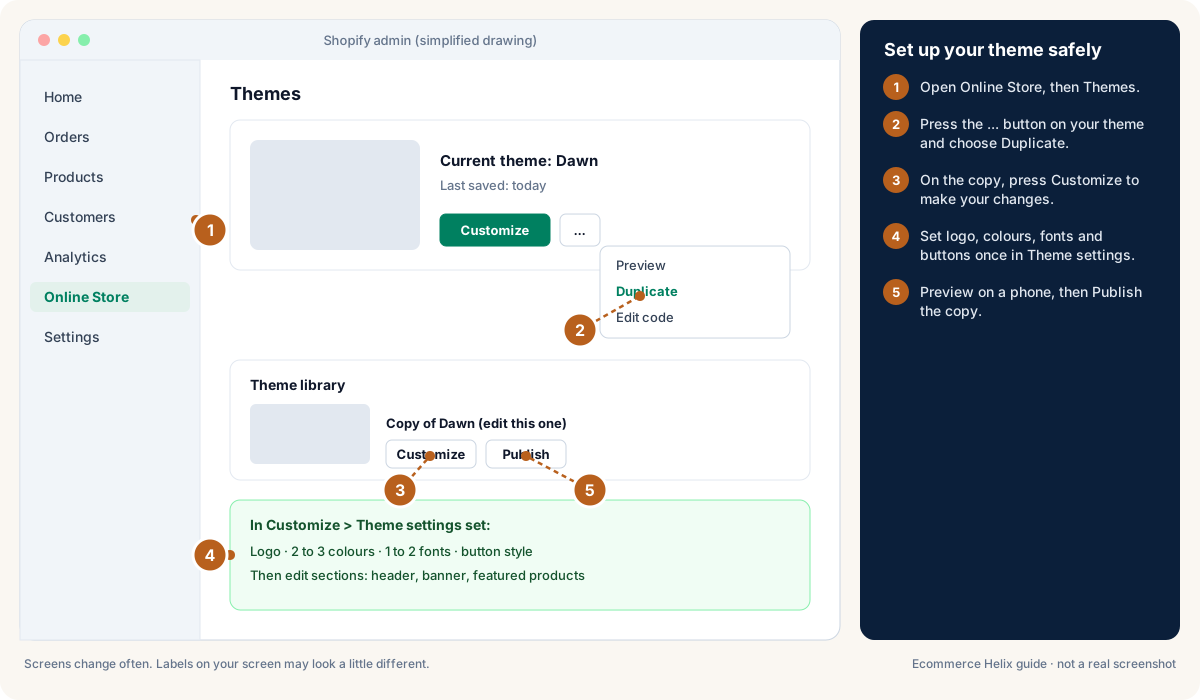
In Online Store > Themes, start with a free Shopify theme such as Dawn (see Shopify: themes).

Expected result

A fast, supported theme is installed.

Watch out

Only pay for a theme if it has a feature you truly need and you have checked its speed on a phone.

Good to know

Set up your theme safely in Shopify

Drawing, not a real screenshot. Labels on your screen may look a little different. Official help: Shopify: themes

Lesson 22.4: Build the home pageConvert

Why this matters

The home page should answer three questions in a few seconds: what is this, is it for me, and why should I trust it. Build the top first, then the sections below in a proven order.

0 of 5 steps done

Step 1 of 5

In the theme editor, add a promo bar with one short line, such as your shipping offer or a guarantee.

Expected result

The promo bar shows at the very top on every page.

Lesson 22.5: Product pages: titles, photos and descriptionsConvert

Why this matters

Most buying decisions happen on the product page. Answer every worry before the buyer has to ask, and keep price, rating and Add to cart visible on a phone.

0 of 5 steps done

Step 1 of 5

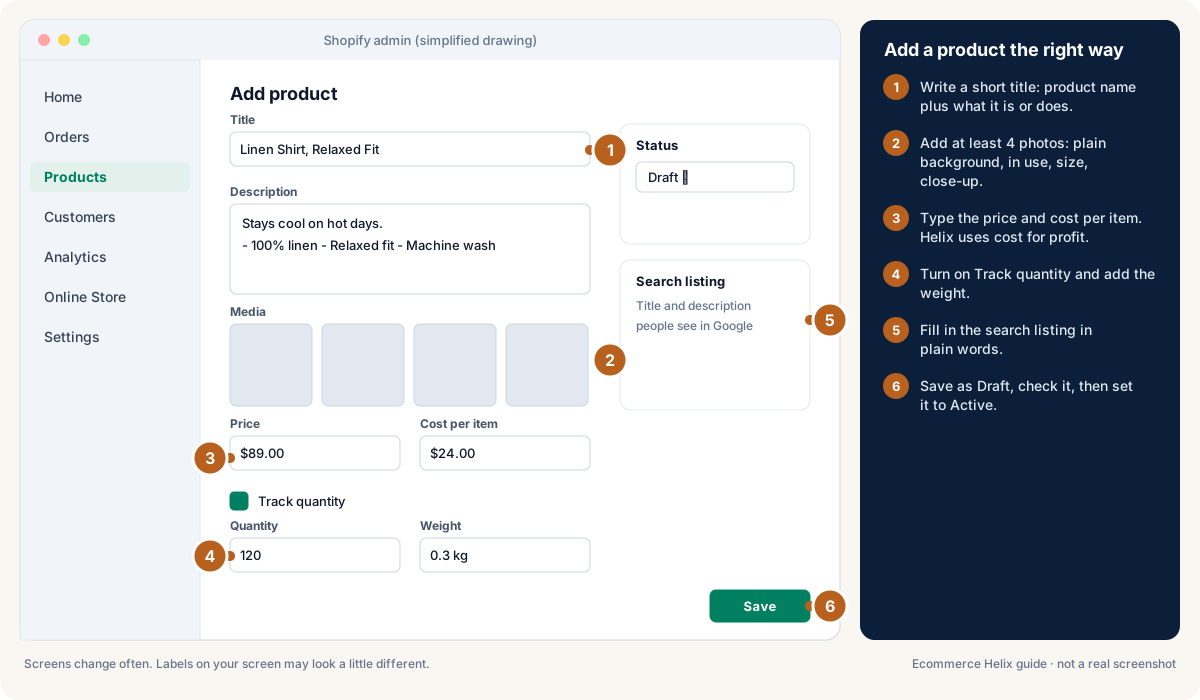
Write a short title: product name plus the main thing it does or is made of ("Linen Shirt, Relaxed Fit").

Expected result

The title is clear and short.

Good to know

Add a product the right way in Shopify

Drawing, not a real screenshot. Labels on your screen may look a little different. Official help: Shopify: adding products

Lesson 22.6: Variants and inventoryConvert

Why this matters

Variants are the options of one product, such as size or colour, and inventory is how many you have. Setting them up properly stops overselling and lets Helix work out profit and shipping correctly.

0 of 4 steps done

Step 1 of 4

Add options (Size, Colour) to one product instead of separate products (see Shopify: variants).

Expected result

One product page shows every option.

Lesson 22.7: ReviewsConvert

Why this matters

People trust other customers more than they trust you. A review app collects and shows reviews automatically, and honest replies to bad reviews build more trust than hiding them.

0 of 4 steps done

Step 1 of 4

Install one review app that collects photo reviews and sends a request email after delivery.

Expected result

Review requests go out automatically.

Why this matters

Collections are groups of products, and menus and search help people find them. A new visitor should reach any product in 3 taps or fewer.

0 of 4 steps done

Step 1 of 4

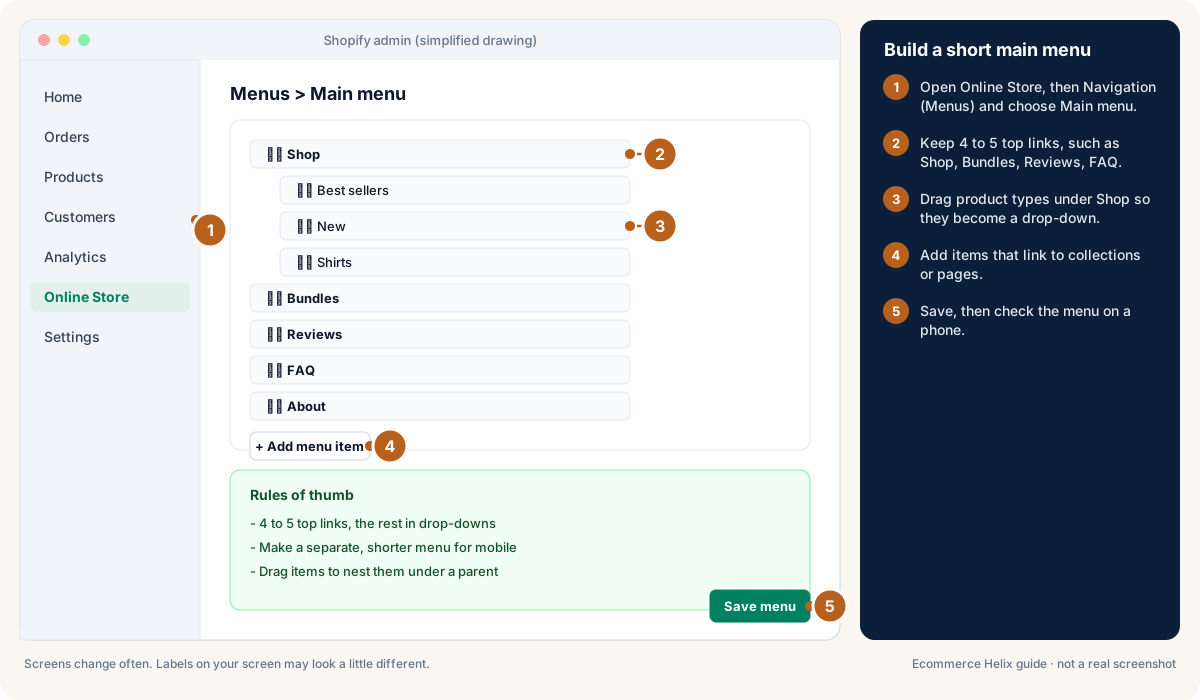
Create collections for Best sellers, New, and one per product type, using automatic collections where you can (see Shopify: collections).

Expected result

Collections update themselves as products change.

Good to know

Build a short main menu in Shopify

Drawing, not a real screenshot. Labels on your screen may look a little different. Official help: Shopify: menus and links

Lesson 22.9: Shipping zones, rates and a free-shipping amountConvert

Why this matters

Surprise shipping costs are one of the main reasons people leave at checkout. Simple rates, a free shipping amount and honest delivery ranges fix most of it.

0 of 4 steps done

Step 1 of 4

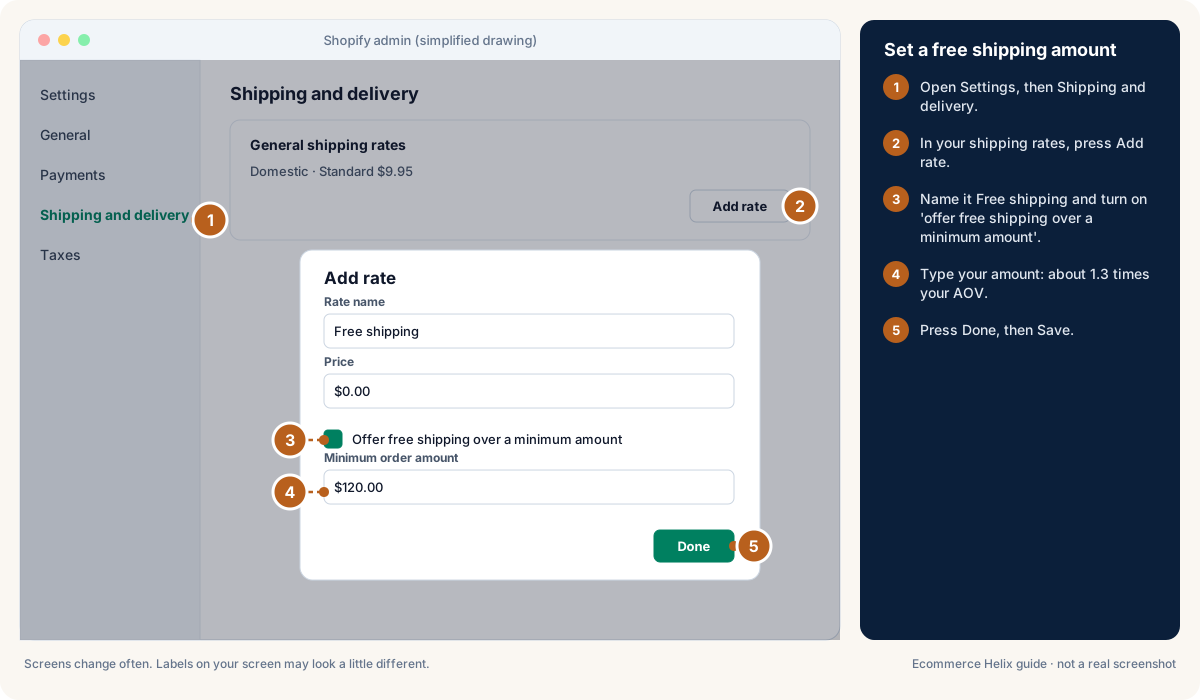
In Settings > Shipping and delivery, create a zone for your home country.

Expected result

A home country zone exists.

Good to know

Set a free shipping amount in Shopify

Drawing, not a real screenshot. Labels on your screen may look a little different. Official help: Shopify: set up shipping rates

Lesson 22.10: Taxes: GST and sales tax basicsConvert

General information, not tax or legal advice. Tax rules change and depend on your situation. Check with a registered tax agent or accountant before you decide.

Why this matters

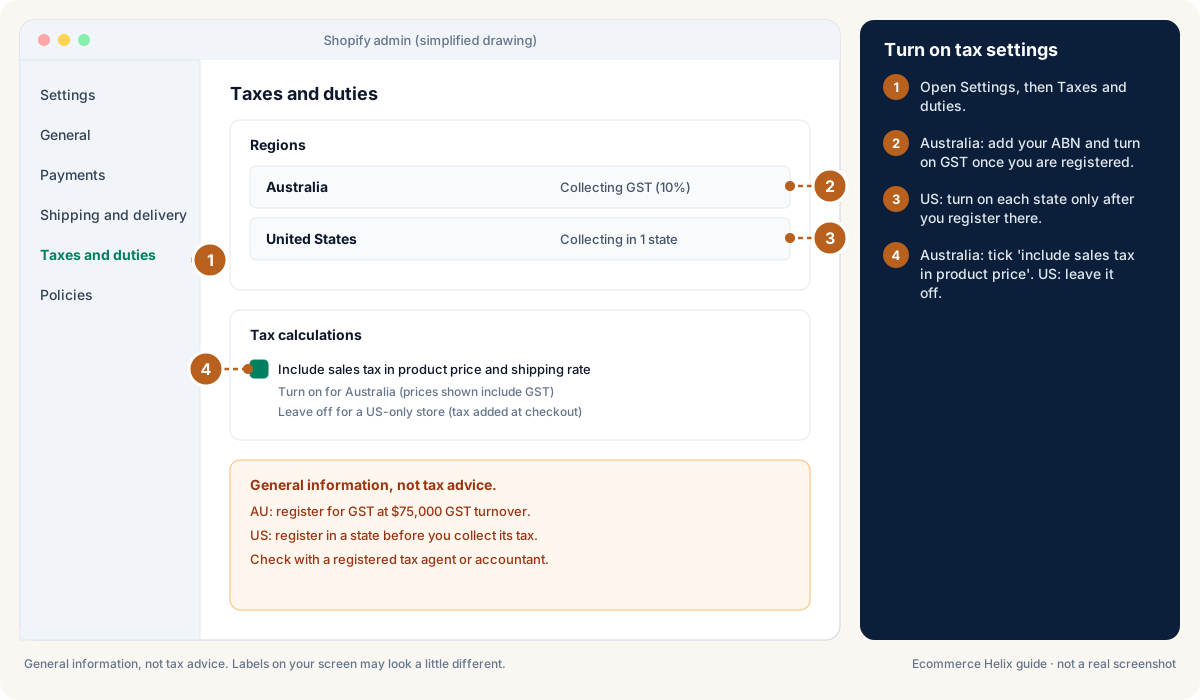
Tax set up wrong either costs you money or breaks the law. In Australia, GST registration is required once turnover reaches $75,000; in the US, sales tax depends on nexus (a strong enough connection to a state). Helix strips GST from your sales before any profit maths.

0 of 5 steps done

Step 1 of 5

Australia: check whether your GST turnover (this month plus the previous 11) has reached $75,000 or will in the next 12 months, and register within 21 days if so (see ATO: registering for GST).

Expected result

You know whether you must register.

Good to know

Turn on tax settings in Shopify

Drawing, not a real screenshot. Labels on your screen may look a little different. Official help: Shopify: taxes

Lesson 22.11: PaymentsConvert

Why this matters

Let people pay the way they like, because every extra step at checkout loses buyers. Express wallets and a recognisable statement name cut drop-offs and disputes.

0 of 4 steps done

Step 1 of 4

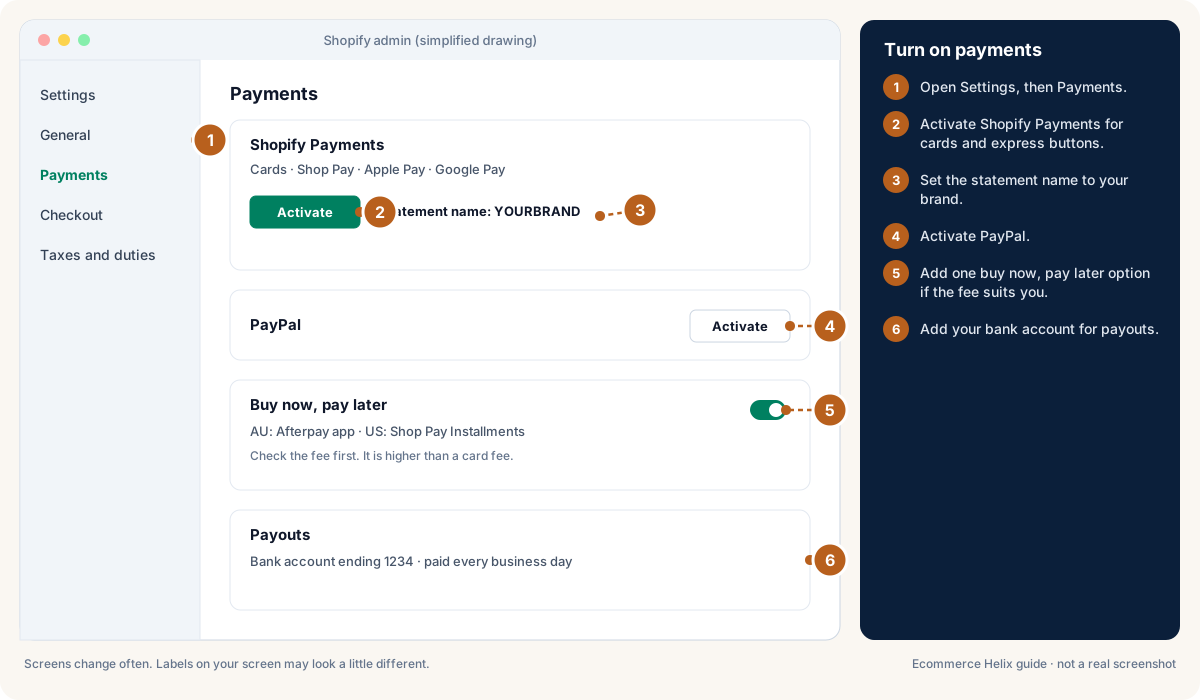
In Settings > Payments, turn on Shopify Payments if available in your country (see Shopify Payments).

Expected result

Cards are accepted with lower total fees.

Good to know

Turn on payments in Shopify

Drawing, not a real screenshot. Labels on your screen may look a little different. Official help: Shopify Payments

General information, not legal advice. Check your policies with a lawyer if you are unsure.

Why this matters

Clear policies build trust and keep you within the law. Write them in plain words a 12-year-old could follow, and link them where buyers look.

0 of 4 steps done

Step 1 of 4

In Settings > Policies, create Refund, Privacy, Terms of service, Shipping and Contact pages from Shopify's templates (see Shopify: store policies).

Expected result

All five policy pages exist.

Lesson 22.13: Essential apps (and only those)Convert

Why this matters

Every app can slow your store and adds a monthly cost. A small starter set covers almost everything a new store needs. See Module 18 for when to add more.

0 of 4 steps done

Step 1 of 4

Install the starter set only: a reviews app, Shopify Email or Klaviyo, the Facebook & Instagram and Google & YouTube sales channels, and (optionally) a post-purchase offer app; add subscriptions only if you sell refills.

Expected result

Your app list is short and every app has a job.

Lesson 22.14: Tracking: Meta pixel, Google tag and analyticsAttract

Why this matters

Without tracking, you cannot tell which ads bring sales. Set it up before you spend a dollar on ads, then prove it works with one test order.

0 of 5 steps done

Step 1 of 5

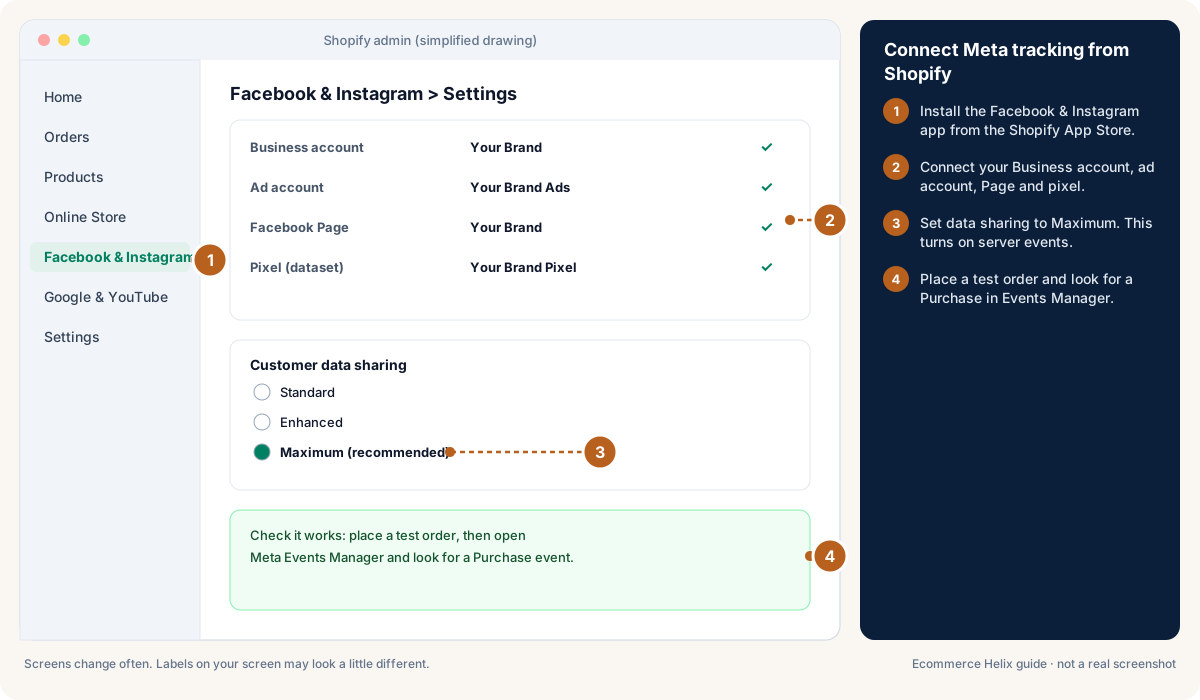
Install the Facebook & Instagram app and connect your business account, ad account, page and pixel (see Shopify: Facebook and Instagram).

Expected result

The app shows all four connected.

Connect Meta to Helix

Good to know

Connect Meta tracking from Shopify

Drawing, not a real screenshot. Labels on your screen may look a little different. Official help: Shopify: Facebook and Instagram

Lesson 22.15: Speed and mobileConvert

Why this matters

Most shoppers are on a phone, and a slow store wastes every ad dollar. Aim for a product page that loads in about 3 seconds on mobile data.

0 of 4 steps done

Step 1 of 4

Test your home page and a product page in PageSpeed Insights on mobile.

Expected result

You have a mobile score and Core Web Vitals for both.

Lesson 22.16: Place test ordersConvert

Why this matters

A test order proves that payments, emails, stock and tracking all work together. It is the last step before real customers.

0 of 5 steps done

Step 1 of 5

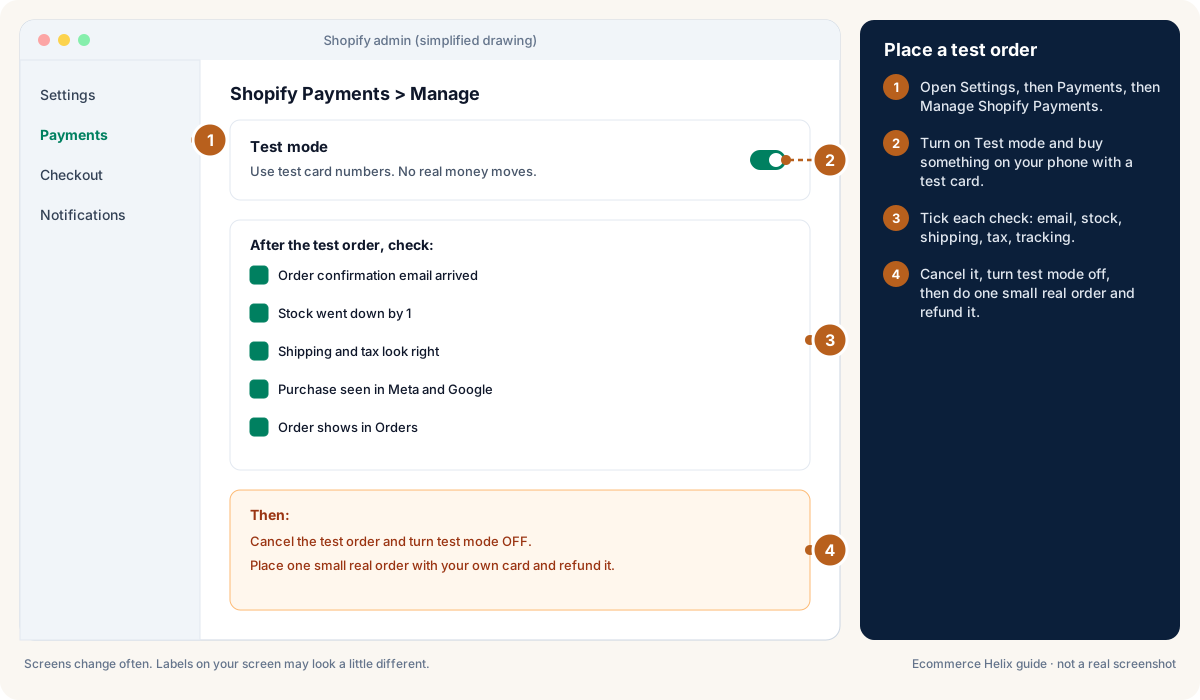
Turn on test mode for Shopify Payments, or use the Bogus Gateway (see Shopify: test orders).

Expected result

Checkout accepts test card numbers.

Good to know

Place a test order in Shopify

Drawing, not a real screenshot. Labels on your screen may look a little different. Official help: Shopify: test orders

Lesson 22.17: Pre-launch checklistConvert

Why this matters

One last checklist before you launch or turn on ads catches the small things that cost the first sales.

0 of 3 steps done

Step 1 of 3

Go through every row of the table below and tick it off.

Expected result

Every row is ticked.

Good to know

Area Check
Domain Own domain is primary; emails come from your domain
Theme Published copy you tested; logo, colours and fonts set
Home page Promise, one button and proof visible on a phone
Products 4+ photos, price, rating, FAQ, cost and weight on every variant
Collections and menu 4 to 5 menu links; filters on; search works
Shipping Home zone, clear rates, free-shipping amount shown
Taxes GST or state settings checked (with your accountant)
Payments Cards, Shop Pay, Apple Pay, PayPal; statement name set
Policies Refund, privacy, terms, shipping and contact linked in footer
Apps Only the starter set; speed checked after each
Tracking Test Purchase seen in Meta and Google
Speed Mobile pages load in about 3 seconds
Password Store password removed when you are ready to launch

Words to know in this module

Domain
Your store's web address, like yourbrand.com.
Theme
The design template for your Shopify store. It controls how every page looks.
Test order
A pretend order you place yourself to check payments, emails and tracking work.
Profit
What is left from sales after product cost, shipping, payment fees, discounts, refunds and ads. This is the number Helix cares about most.
Variant
One option of a product, like a size or colour, with its own stock and price.
GST
Goods and services tax: 10% in Australia (15% in New Zealand), added to most sales once you are registered.
Sales tax
In the US, a tax set by each state (and some cities) that the seller collects at checkout.
Product cost
What one item costs you to make or buy, including freight to your warehouse.
Guarantee
A clear promise that removes the fear of a bad purchase, like a 30-day money-back promise.
SKU
Stock keeping unit: a short code you give each product option so you can track it.
Nexus
In the US, a link with a state (like a warehouse there, or enough sales into it) that means you must collect its sales tax.
Duties
Taxes charged by a country on goods coming in from overseas.
VAT
Value added tax: the UK and EU version of GST, usually included in the shown price.
Express wallets
One-tap payment options like Apple Pay, Google Pay and Shop Pay.
All words to know