Module 20

Ad performance analysis, audiences and campaign setup

12 lessons, 54 stepsOne instruction at a time, each with the result to expect. Tick steps as you go; Helix remembers.

Outcome: you can set up audiences and campaigns correctly on Meta, Google and TikTok, read your results like an analyst, find the real cause of a problem (the ad, the page, the offer or the checkout), and report it in a way that leads to a clear decision.

Related: Module 6 Defining campaigns, Module 7 Meta ads, Module 8 Google ads, Module 2 Diagnose and fix, SOP 05, SOP 06, SOP 09

In plain words

Stage: Attract (get seen by people who want what you sell). Every lesson below is tagged with its stage; see Attract, Convert, Grow.

What it is: How to set up ads correctly and read your results like a pro.

Why it matters: Good setup means you can trust the numbers. Good reading means you fix the real problem.

Do this:

  1. Check that your pixel and sales tracking work before you spend.
  2. Set up your campaign step by step (drawings below).
  3. When results drop, check in order: the ad, the page, the offer, the checkout.

Words to know:

  • Pixel: A small piece of code on your store that tells Meta when someone views, adds to cart or buys.
  • UTM: Tags added to the end of a link so your analytics can tell which ad or email a visitor came from.
  • Attribution: Deciding which ad or channel gets credit for a sale.
  • Funnel: The steps from seeing an ad to buying: visit, add to cart, checkout, order.

All words are explained in the glossary.

Lesson 20.1: Before you launch: tracking you can trustAttract

Why this matters

Bad data leads to bad decisions, and a broken pixel can make good ads look like failures. Check tracking once now, then every month. Your store's own reports are the truth; ad platforms are only for direction.

0 of 6 steps done

Step 1 of 6

In Meta Events Manager and Google Ads Goals > Conversions, confirm the pixel (or Google tag) and server events (Conversions API on Meta, enhanced conversions on Google) are connected through your store platform.

Expected result

Both show purchases from browser and server.

Connect Meta to Helix

Lesson 20.2: Setting up target audiencesAttract

Why this matters

Audiences tell each platform who already knows you, so cold campaigns find new people and warm campaigns reach the right ones. Set them up once on Meta, Google and TikTok, then reuse them in every campaign.

0 of 7 steps done

Step 1 of 7

On Meta, set account-wide audience segments in Ad account settings > Audience segments: engaged audience (visitors and social engagers) and existing customers (customer list or store connection).

Expected result

Reports show how much spend reaches brand-new people.

Good to know

Layer Who Example targeting
Cold Never interacted with you Broad, with harsh or light exclusions
Mixed Anyone; the platform decides Automated Sales campaign with a cap on existing customers
Warm Engaged but not bought Visitors (180 days), engagers, video viewers, leaving out buyers
Hot Close to buying Added to cart (14 days), started checkout (7 days), leaving out buyers from the last 7 days
Existing customers Bought before Buyers, for launches and products people reorder

Lesson 20.3: Setting up a Meta sales campaign step by stepAttract

Why this matters

A Meta sales campaign set up correctly in ten steps gives every ad a fair test. Helix can build steps 2 to 7 for you as a paused draft in your own account, which you check and switch on.

0 of 9 steps done

Step 1 of 9

Write the campaign brief first (Lesson 6.16): target CPA, audience layer, budget and stop rule.

Expected result

The brief is finished before you open Ads Manager.

Good to know

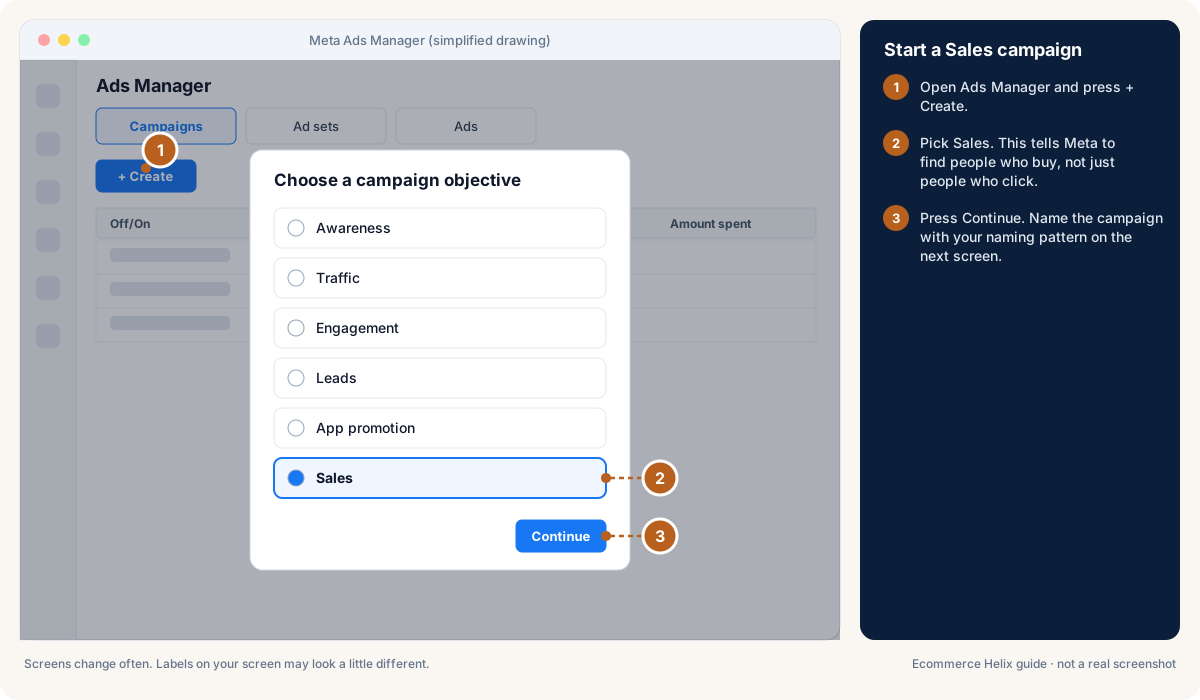
Start a Sales campaign in Meta Ads Manager

Drawing, not a real screenshot. Labels on your screen may look a little different. Official help: Meta: create a campaign in Ads Manager

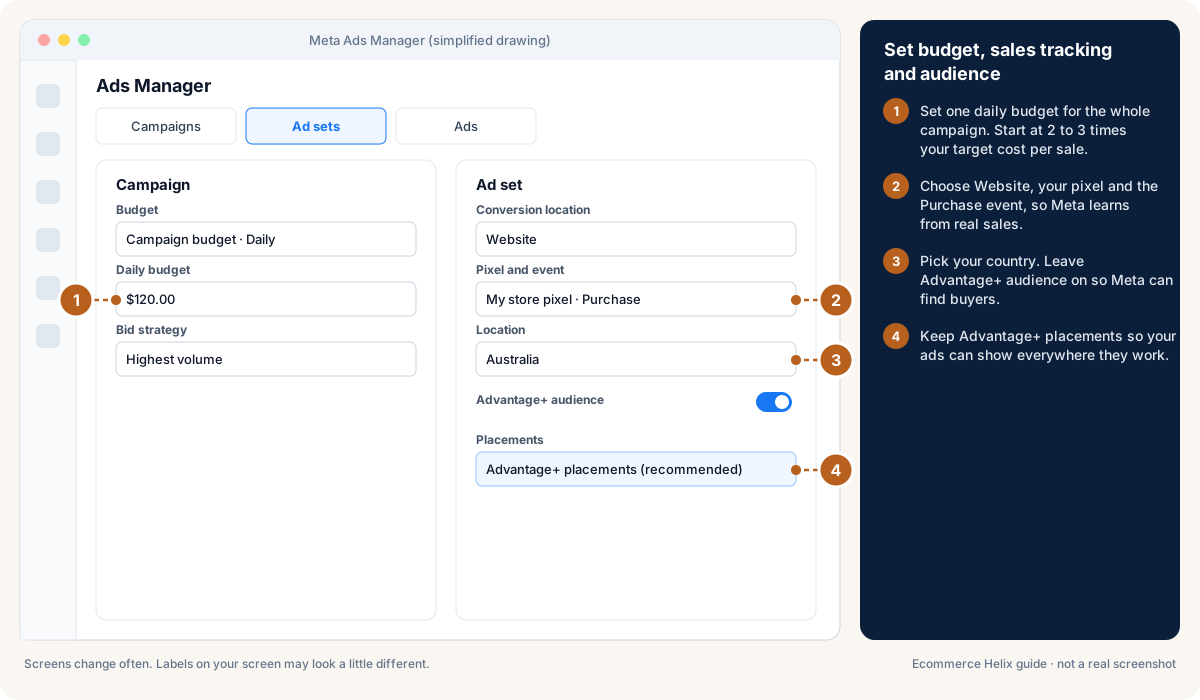
Set budget, sales tracking and audience

Drawing, not a real screenshot. Labels on your screen may look a little different.

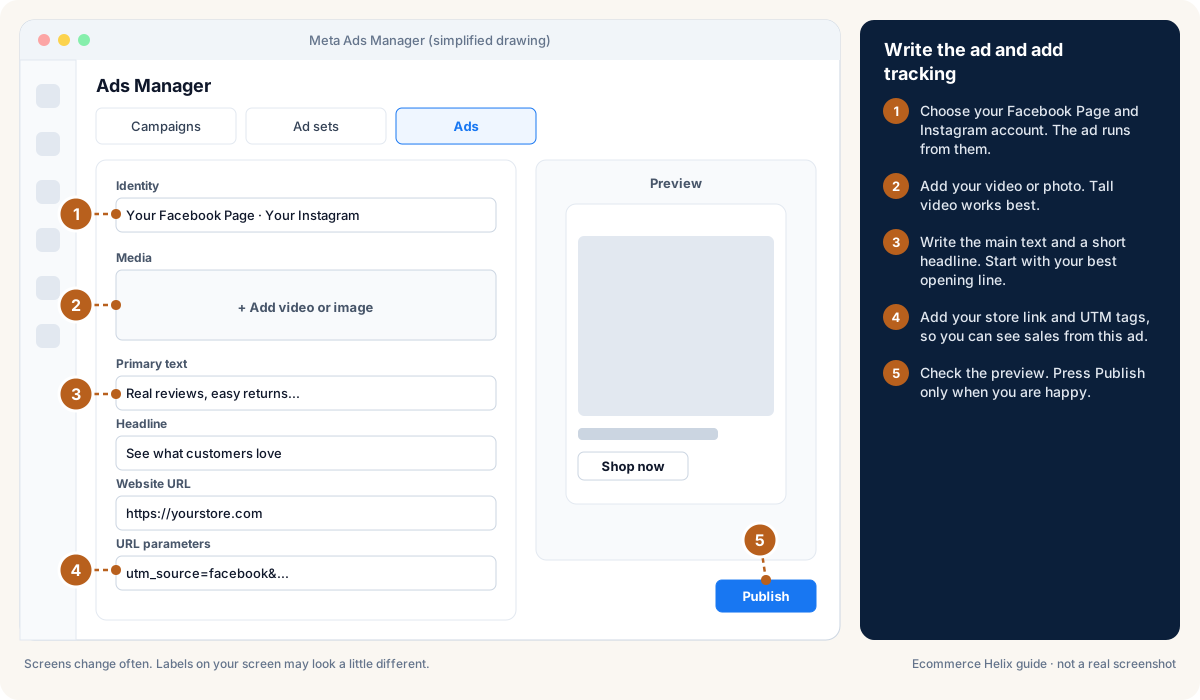
Write the ad and add tracking

Drawing, not a real screenshot. Labels on your screen may look a little different.

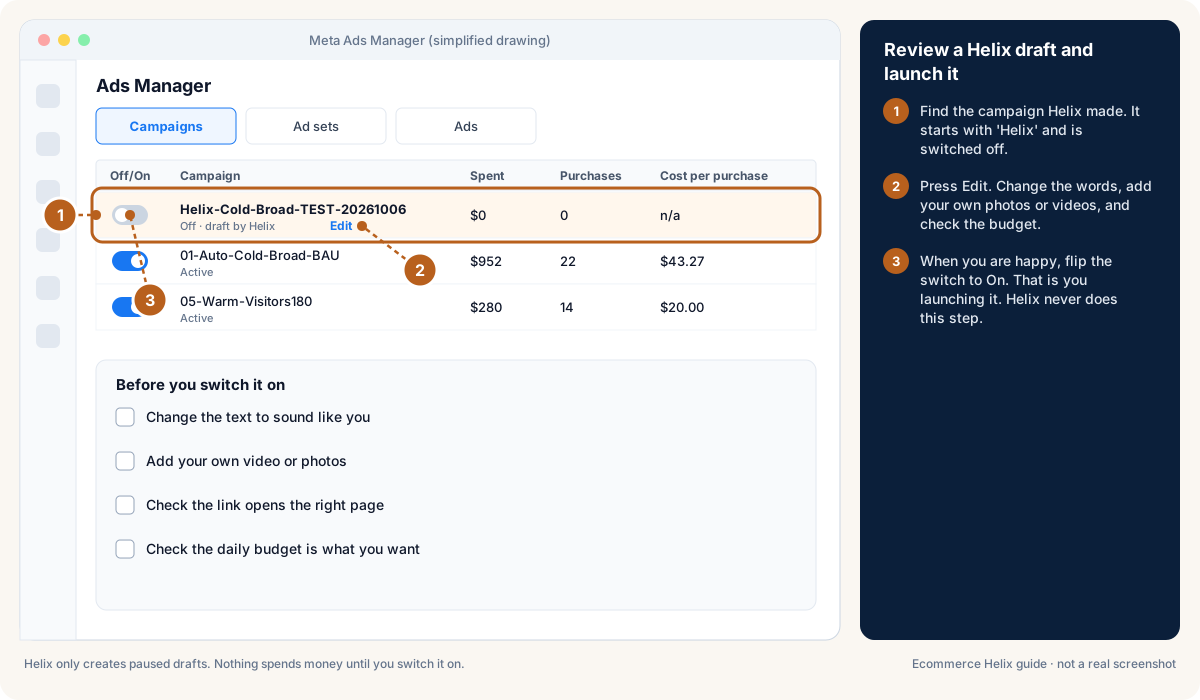
Review a Helix draft and launch it

Drawing, not a real screenshot. Labels on your screen may look a little different.

Lesson 20.4: Setting up Google step by stepAttract

Why this matters

Google works best with three building blocks: brand search to protect your name, a feed-only Performance Max or Shopping campaign for products, and non-brand search once you know your best terms. Build them in that order.

0 of 5 steps done

Step 1 of 5

Create a brand search campaign: Search, Sales goal, bidding Maximise conversions or Target impression share, keywords of your brand and misspellings in exact and phrase match, responsive search ads with sitelinks, callouts and price or promotion assets.

Expected result

Searches for your name show your ad, and the campaign is never "Limited by budget".

Good to know

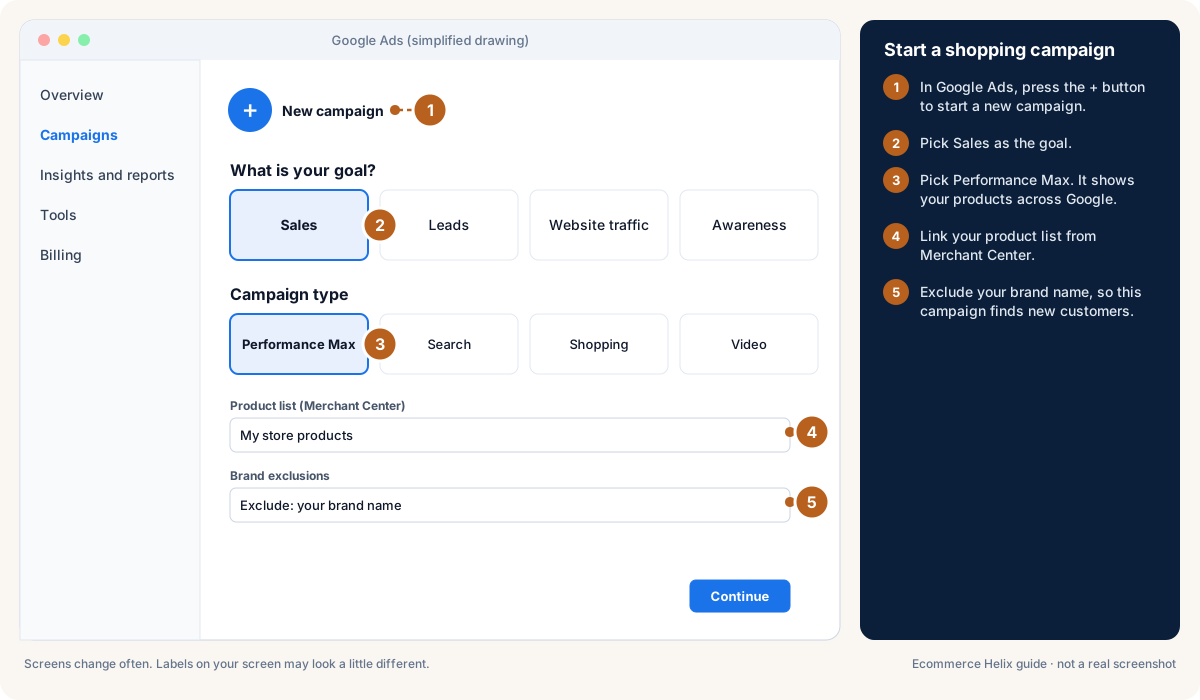
Start a Performance Max campaign in Google Ads

Drawing, not a real screenshot. Labels on your screen may look a little different. Official help: Google: about Performance Max campaigns

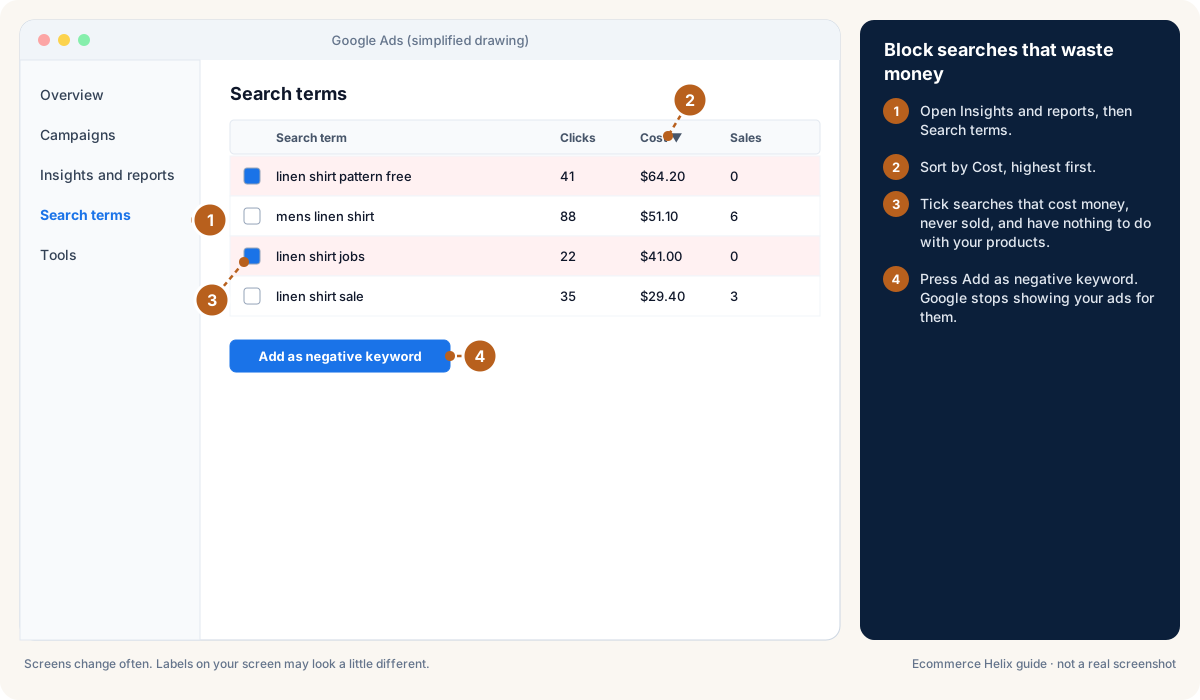
Block searches that waste money

Drawing, not a real screenshot. Labels on your screen may look a little different. Official help: Google: add negative keywords

Lesson 20.5: Setting up a TikTok campaign step by stepAttract

Why this matters

TikTok campaigns follow the same logic as Meta with a few differences: a different purchase event name, jumpier learning and sales that often show up under other channels.

0 of 4 steps done

Step 1 of 4

Create a campaign with the Sales objective (website conversions or TikTok Shop) and the pixel event Complete payment.

Expected result

The campaign optimises for purchases.

Lesson 20.6: The metric treeAttract

Why this matters

Sales from ads come from a chain of steps, from showing the ad to the size of the order. Improve one link and everything below it moves, so finding the weak link is the fastest win.

0 of 2 steps done

Step 1 of 2

Read the metric tree below from top to bottom and write your current number next to each step.

Expected result

You have a number for CPM, CTR, cost per click, landing page view rate, add to cart rate, checkout rate, purchase rate and AOV.

Open your key metrics

Good to know

Spend
 └─ CPM (cost to show the ad 1,000 times)
     └─ CTR (out of 100 who see it, how many click)   ← the ad and its message
         └─ Cost per click
             └─ Landing page view rate                  ← page speed, tracking
                 └─ Add to cart rate                     ← product page, offer, price
                     └─ Checkout rate                    ← shipping cost, trust, payment options
                         └─ Purchase rate
                             └─ AOV (average order)      ← bundles, free shipping amount, upsells

Lesson 20.7: Cross-diagnosis: is it the ad, the page, the offer or the checkout?Attract

Why this matters

When results drop, the cause can be the ad, the page, the offer or the checkout. This table maps each pattern of numbers to its likely cause and fix. Helix runs the same rules for you in What to fix.

0 of 3 steps done

Step 1 of 3

Open What to fix in Helix to see which patterns it has found in your numbers.

Expected result

You see any matching insights with evidence.

See what Helix found

Good to know

What you see Likely cause What to check and fix
Good hook rate and CTR, but few visitors buy The landing page or offer Mobile page speed. Does the page match the ad? Is the offer clear at the top? Trust (reviews, guarantee). Mobile checkout.
Lots of add to carts, but few finish checkout Something in checkout puts people off Surprise shipping cost, a slow or long checkout, missing payment options (Apple Pay, buy now pay later), forced account sign-up, unclear delivery time.
Visitors from other channels buy well, but ads get few clicks The ad itself New hooks, new angles, new formats. Check the offer is in the ad.
Low hook rate, but OK CTR from people who watch The first seconds Re-cut the first 3 seconds. Test new visual and spoken hooks.
Good hook rate, low hold rate The middle of the video Tighten the middle, show the product sooner, add proof.
Frequency and CPM rising, CTR falling People are tired of the ads, or the audience is used up Launch a new batch of ads. Go broader. Check reach grows with spend.
CPM jumps across all campaigns The season, or more advertisers competing Expect it in busy periods. Protect your margin and lean on email and SMS.
Platform ROAS looks fine, but MER is getting worse Platforms taking credit for sales they did not cause, often retargeting Move budget to cold, check the share of new customers, run a holdout test (Lesson 20.9).
Plenty of clicks, few landing page views A slow page or broken tracking Test page speed. Check the pixel fires when the page loads.
Good conversion, small orders Missing ways to raise order value Free shipping amount, bundles, a free gift, an offer after purchase.
Lots of views, few clicks Weak call to action, or the wrong people A clear call to action, the offer in the ad, a hook that attracts buyers not browsers.
Lots of refunds after a campaign The ad promised too much Make claims match reality. Improve size or fit guidance.

Lesson 20.8: Breakdowns that reveal problemsAttract

Why this matters

Breakdowns split your results by group in Ads Manager and reveal problems hidden in averages. Look at them weekly, not daily.

0 of 4 steps done

Step 1 of 4

In Ads Manager click Breakdown > By delivery > Placement and check whether one placement (for example Audience Network) spends a lot at a high cost per sale.

Expected result

You know your best and worst placements.

Lesson 20.9: Attribution and incrementalityAttract

Why this matters

Every platform claims credit for the same sale. Incrementality means sales that would not have happened without the ad. Five rules keep you honest.

0 of 5 steps done

Step 1 of 5

Use MER (total ad spend divided by total store sales) as your first number.

Expected result

You judge ads by the store's real sales.

Open your growth dashboard

Lesson 20.10: Your analysis rhythmGrow

Why this matters

A fixed rhythm of daily, weekly, monthly and quarterly checks means nothing is missed and nothing is over-checked.

0 of 2 steps done

Step 1 of 2

Put the daily, weekly, monthly and quarterly checks from the table below into your calendar.

Expected result

Each check has a recurring slot.

Add it to your calendar

Good to know

When Time What to do
Daily 10 minutes Read your scorecard (MER, contribution profit). Stop money-wasting ads. Give more to winners. Check spend is on pace.
Weekly 45 minutes Ad report (hook rate, hold rate, CTR and cost per sale by idea), breakdowns, search terms, brief the next batch.
Monthly 2 hours MER and contribution profit against target, share of new customers, channel mix, test results, next month's plan.
Every 3 months Half a day A holdout test, a review of your account setup, and the budget plan for the next busy season.

Lesson 20.11: Reporting that leads to decisionsGrow

Why this matters

A report is only useful if it leads to a decision. Four questions do that; dashboards with 40 numbers do not.

0 of 3 steps done

Step 1 of 3

Start each report with what happened: sales, contribution profit and MER against target.

Expected result

Three numbers open every report.

Open your growth dashboard

Lesson 20.12: Common analysis mistakesAttract

Why this matters

Most analysis mistakes come from judging too soon or comparing the wrong things. Checking for these six saves money.

0 of 4 steps done

Step 1 of 4

Never judge an ad after one day or $10 of spend.

Expected result

Every ad gets its full test spend first.

Self-check

  1. Hook rate 35%, CTR 1.6%, conversion rate 0.6%. Where is the problem?
  2. Your add to cart rate is double normal, but few people check out. What three things do you check first?
  3. Platform ROAS is stable but MER is rising. What might be happening?
  4. Why start Google Performance Max as feed-only, with your brand excluded?
  5. Name four custom audiences to build on day one.
Answers
  1. The ad works. The page or offer does not. Check speed, whether the page matches the ad, how clear the offer is, trust signs and mobile checkout.
  2. Surprise shipping cost, checkout steps and payment options, and forced account sign-up.
  3. Retargeting or double-counting is taking credit while fewer new customers arrive. Move budget to cold, check the share of new customers, and run a holdout test.
  4. It behaves like Shopping (clearer data), and it stops Performance Max claiming cheap brand searches as its own wins.
  5. Any four of: visitors (30 and 180 days), product viewers, add to cart, started checkout, buyers, engagers, video viewers, email list.

Words to know in this module

Campaign
The top level in an ad account. It holds the goal, like getting sales.
Pixel
A small piece of code on your store that tells Meta when someone views, adds to cart or buys.
UTM
Tags added to the end of a link so your analytics can tell which ad or email a visitor came from.
Attribution
Deciding which ad or channel gets credit for a sale.
Funnel
The steps from seeing an ad to buying: visit, add to cart, checkout, order.
Server events
Sales sent to Meta straight from your store's server, so fewer sales go untracked.
Test order
A pretend order you place yourself to check payments, emails and tracking work.
Domain
Your store's web address, like yourbrand.com.
Custom audience
A list Meta builds from your own data, like site visitors or customers.
Lookalike
People Meta thinks are similar to a list you give it, like your best customers.
PMax
A Google campaign type that shows your products across Search, Shopping, YouTube and more from one campaign.
Negative keyword
A word you tell Google never to show your ads for, to stop wasted clicks.
Broad targeting
Letting Meta find buyers with few or no audience limits. Works best with strong ads.
Partnership ad
An ad that runs from a creator's own account, so people see their name instead of yours.
All words to know