Module 8

Google ads in practice

11 lessons, 40 stepsOne instruction at a time, each with the result to expect. Tick steps as you go; Helix remembers.

Outcome: a clean Google setup that shows your products to people already searching for them, at a profit, and that you can look after once a week.

Related SOP: 09 Google Shopping, PMax and Search

In plain words

Stage: Attract (get seen by people who want what you sell). Every lesson below is tagged with its stage; see Attract, Convert, Grow.

What it is: How to show your products on Google when people search for them.

Why it matters: People on Google are already looking to buy. It catches demand your other ads create.

Do this:

  1. Connect your product list (Merchant Center).
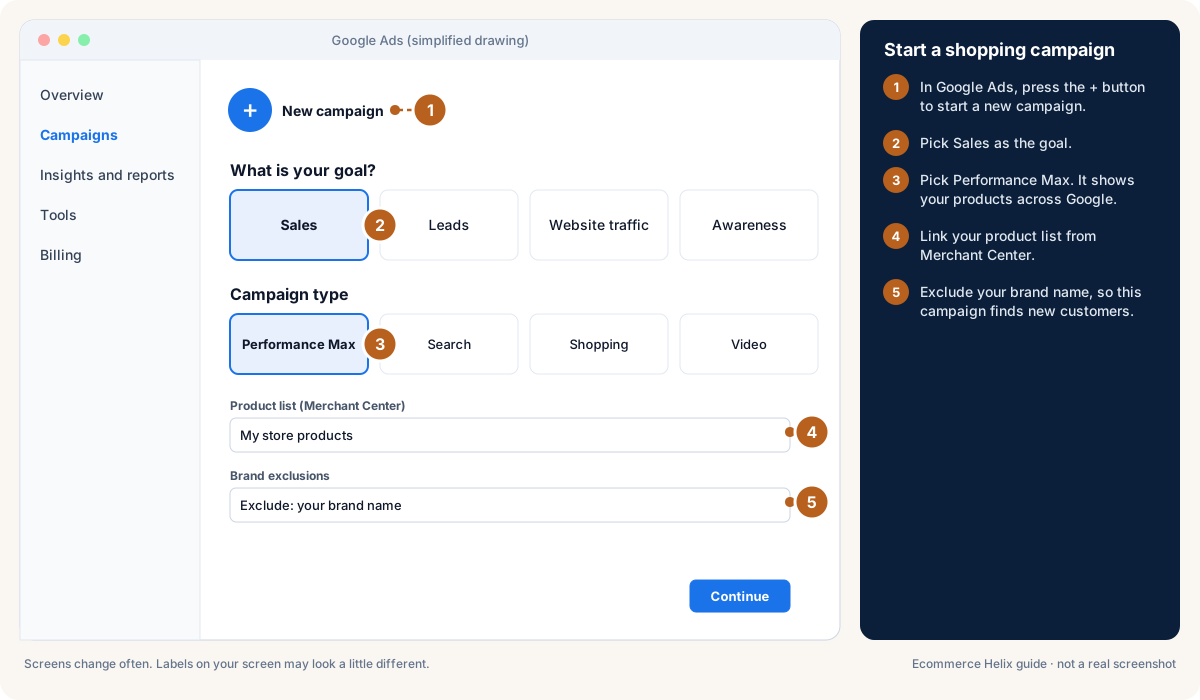
  2. Start a Performance Max campaign and exclude your brand name.
  3. Once a week, block searches that cost money and never sell.

Words to know:

  • PMax: A Google campaign type that shows your products across Search, Shopping, YouTube and more from one campaign.
  • Product feed: The list of your products, prices and photos that Google and Meta read to make shopping ads.
  • Search terms: The exact words people typed into Google before they saw or clicked your ad.
  • Negative keyword: A word you tell Google never to show your ads for, to stop wasted clicks.

All words are explained in the glossary.

Lesson 8.1: FoundationsAttract

Why this matters

A clean Google foundation means every dollar is tracked and nothing changes without you. Do this once before you spend money, tick each step, and recheck tracking monthly.

0 of 6 steps done

Step 1 of 6

In Google Ads open Admin > Access and security and confirm you (not an agency) are an admin owner of the account.

Expected result

Your own email is listed with Admin access. If an agency owns it, ask them in writing to transfer ownership to you.

Lesson 8.2: Product dataAttract

Why this matters

Shopping ads are built from your product feed, so better product data means better ads and cheaper clicks. Most gains come from titles, images and fixing errors.

0 of 5 steps done

Step 1 of 5

Rewrite product titles with search words first: brand, product type, then key feature (for example "Acme Linen Shirt, Men's, Relaxed Fit, Sand").

Expected result

Your top 20 products have search-first titles.

Lesson 8.3: Campaign structuresAttract

Why this matters

The right Google setup depends on your size. Starting simple, then adding campaigns as you grow, keeps each campaign fed with enough data.

0 of 4 steps done

Step 1 of 4

If you are small, run brand search plus one feed-only Performance Max (PMax: Google decides where to show your products across Search, Shopping, YouTube and Gmail) or Shopping campaign.

Expected result

You have two campaigns: brand search and a product campaign.

Good to know

Start a Performance Max campaign in Google Ads

Drawing, not a real screenshot. Labels on your screen may look a little different. Official help: Google: about Performance Max campaigns

Lesson 8.4: Keyword researchAttract

Why this matters

Keywords are the search words you want your ads to show for. Buying words with clear intent bring buyers; vague words bring browsers.

0 of 4 steps done

Step 1 of 4

List buying words: "buy", "best", "price", or the product type plus a feature ("linen shirt men").

Expected result

You have 20 to 50 candidate keywords.

Lesson 8.5: Writing search adsAttract

Why this matters

Search ads are short, so every line has to earn its place. Mixing benefit, offer, proof and urgency lets Google find the best combination.

0 of 3 steps done

Step 1 of 3

Write up to 15 headlines mixing product plus benefit, the offer, proof (reviews, years in business), urgency and your brand, and pin 1 or 2 so they always show.

Expected result

The ad strength meter shows "Good" or "Excellent".

Lesson 8.6: Target ROASGrow

Why this matters

Target ROAS tells Google how many dollars of sales you want for each $1 of ads. Set it from your break-even, not a guess, and change it gently.

0 of 3 steps done

Step 1 of 3

Work out break-even ROAS as 1 divided by (1 minus VCR); with VCR at 45% that is about 1.82.

Expected result

You have your break-even ROAS.

Open your key metrics

Lesson 8.7: New customer acquisitionAttract

Why this matters

New customers grow the store; repeat customers are cheaper to reach in other ways. Google can bid more for new customers or show ads only to them.

0 of 2 steps done

Step 1 of 2

Upload your customer list in Audience manager > Your data segments.

Expected result

Google knows who has already bought.

Lesson 8.8: Weekly optimisationAttract

Why this matters

Ten to twenty minutes once a week keeps Google profitable. Most waste hides in the search terms report.

0 of 4 steps done

Step 1 of 4

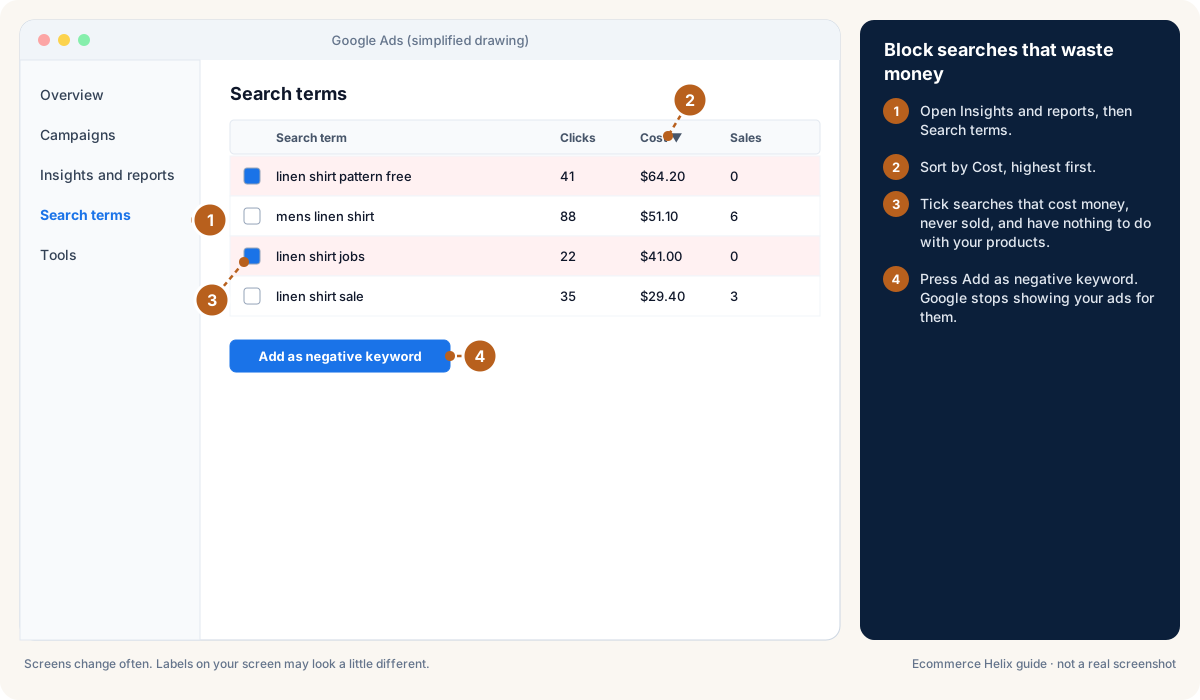
Open Insights and reports > Search terms, add searches that cost money and never sell as negative keywords, and add searches that sell well as keywords.

Expected result

Wasted searches are blocked and winners are targeted directly.

Good to know

Block searches that waste money

Drawing, not a real screenshot. Labels on your screen may look a little different. Official help: Google: search terms report

Lesson 8.9: Demand Gen and YouTubeAttract

Why this matters

Demand Gen campaigns show short videos and images across YouTube, Discover (the Google app feed) and Gmail. Your best social videos often work here with little change.

0 of 3 steps done

Step 1 of 3

Export your 3 best social videos in both vertical and horizontal versions.

Expected result

You have Demand Gen-ready video files.

Lesson 8.10: Seasonality and salesAttract

Why this matters

Big sales change shopper behaviour overnight, and Google's bidding needs a nudge to keep up. Three settings make the difference.

0 of 3 steps done

Step 1 of 3

In Tools > Bid strategies > Advanced controls, add a seasonality adjustment for the first 1 to 2 days of the sale, expecting about 50% higher conversion rate, then remove it after.

Expected result

Google bids up for the sale's first days and returns to normal after.

Lesson 8.11: AI-driven changes in 2026Attract

Why this matters

In 2026 Google adds more AI features automatically: AI Max for Search and Shopping, AI-written ad text, final URL expansion (Google picks the landing page) and ads in AI Mode answers. They can help, but only if you check what they do.

0 of 3 steps done

Step 1 of 3

Open Campaigns and review any campaign Google upgraded automatically.

Expected result

You know which campaigns now use AI features.

Self-check

  1. How many main (primary) conversions should you have?
  2. What goes at the start of a Shopping product title?
  3. VCR is 45%. What is break-even ROAS?
  4. Name three weekly Google checks.
Answers
  1. One: purchase.
  2. The words people search: brand, product type, key feature.
  3. 1 ÷ 0.55 = about 1.82.
  4. Any three of: search terms, Performance Max insights, campaigns limited by budget, brand versus non-brand split, Merchant Center errors.

Words to know in this module

Profit
What is left from sales after product cost, shipping, payment fees, discounts, refunds and ads. This is the number Helix cares about most.
PMax
A Google campaign type that shows your products across Search, Shopping, YouTube and more from one campaign.
Campaign
The top level in an ad account. It holds the goal, like getting sales.
Product feed
The list of your products, prices and photos that Google and Meta read to make shopping ads.
Search terms
The exact words people typed into Google before they saw or clicked your ad.
Negative keyword
A word you tell Google never to show your ads for, to stop wasted clicks.
Margin
The share of each sale you keep after product cost. A $100 sale with $40 product cost is a 60% margin.
Brand search
Ads that show when people search your brand name. Cheap and usually very profitable.
Theme
The design template for your Shopify store. It controls how every page looks.
ROAS
Return on ad spend: how many dollars of sales you get for each $1 of ads. ROAS 3 means $3 of sales for $1 of ads.
Break-even ROAS
The ROAS where an order makes $0 profit after its costs. Below it, ads lose money.
Creative
The ad itself: the picture or video plus the words.
MER
All ad spend divided by all sales, as a percentage. MER 25% means $25 of ads for every $100 of sales.
Conversion rate
Out of every 100 visits, how many end in an order. 2% means 2 orders per 100 visits.
All words to know